Rampart v0.3: Default Branch Support and HTML Reports
Two small but useful additions to rampart landed this week: automatic default branch resolution and HTML report output.
Default Branch Support
In the launch post, the example config hardcoded branch: main. That works fine if all your repos use main, but plenty of older repos still have master as the default, and some projects use develop or something else entirely. Having to pick one branch name meant rampart would either skip repos or check the wrong branch.
Now you can set branch: default in your config:
branch: default
rules:
  require_pull_request: true
  required_approvals: 1
  # ...
Rampart resolves each repo’s actual default branch via the GitHub API and checks protection rules against that. If one repo uses main and another uses master, both get audited correctly without any manual mapping.
This is the new default when you run rampart init.
HTML Reports
The audit command’s terminal output is fine for a quick check, but sometimes you want something you can share with a team or archive for later. The new --report flag generates a self-contained HTML file:
rampart audit --owner wdm0006 --report report.html
The report includes a summary banner with color-coded counts and per-repo cards showing pass/fail status. Non-compliant repos expand to show exactly which rules differ and what the expected vs. actual values are.
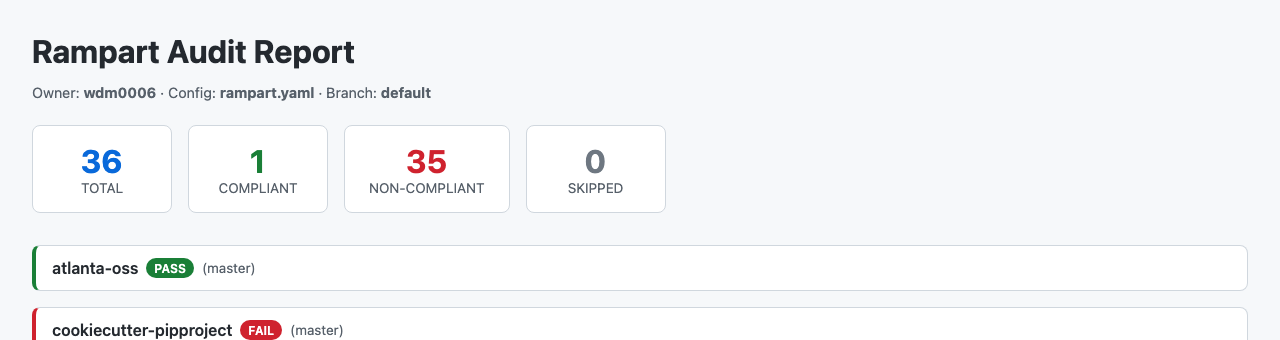
Each failing repo gets a detailed breakdown table so you can see at a glance what needs fixing:
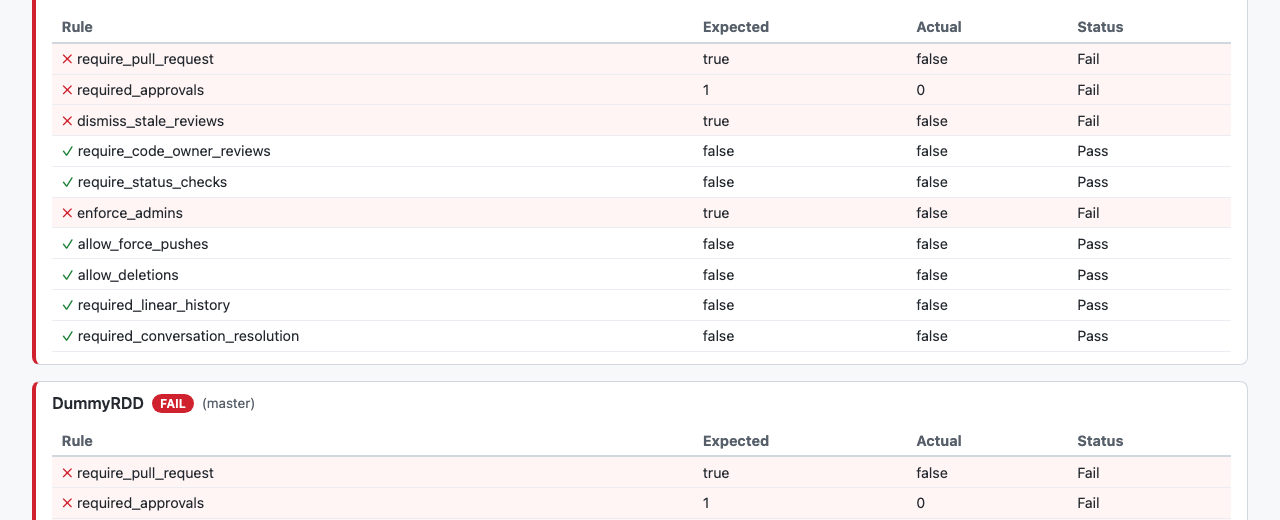
The HTML is fully self-contained with inline CSS – no external assets, no JavaScript. You can email it, drop it in a wiki, or just open it from disk.
The Workflow
Combining both features gives you a pretty nice audit workflow:
# Init with default branch resolution
rampart init

# Audit everything, get a report
rampart audit --owner myorg --report audit-report.html

# Fix one repo at a time
rampart apply --owner myorg --repo some-repo

# Re-audit to confirm
rampart audit --owner myorg --report audit-report.html
I ran this against my own repos and the results were predictably grim – 35 out of 36 non-compliant. After applying rules to atlanta-oss as a test, the re-audit showed it green while everything else stayed red. At least the report makes it easy to see what’s left.
Upgrading
brew upgrade rampart
Or grab v0.3.0 from the releases page.
Stay in the loop
Get notified when I publish new posts. No spam, unsubscribe anytime.